SEO: A crash course
Search Engine Optimization or SEO is an unpaid tool used in marketing and public relations increases the visibility of your website. Here is a crash course guide on what SEO is and how to use it effectively.
What is SEO, exactly?
SEO helps increase the amount of organic searches your website receives. Specifically, Google is one of the main mediums utilized when increasing a website’s SEO.
There are certain concepts that need to be understood before a website can address its SEO.
Index & Crawl
The Index is where Google stores all of its webpages it has knowledge about. In an index entry, the location (URL) and some of the content is detailed.
Crawl is a term used to describe when a “crawler” looks for new & updated sites and webpages. A crawler is the software used to find these websites. Google’s software is called a Googlebot.
Optimization Techniques
There is almost an infinite amount of ways to help Google or other search engines to find your webpages, but here are some simple and effective techniques to help boost your traffic.
Title Tag
A title tag can help crawlers find your website quicker and more effectively. A title that reflects the contents of the webpage accurately can help the algorithm of your page. Each new page on your website should have a unique and brief title that represents what a user will be clicking on when viewing it on Google.
Description Tag
A description tag is just a couple sentences describing what is on the specific webpage. This is contained in a snippet, which is on Google, and includes the title and the description tag. Ensure the description is accurate to the content on the webpage. The description should also be unique for each web page on your website.
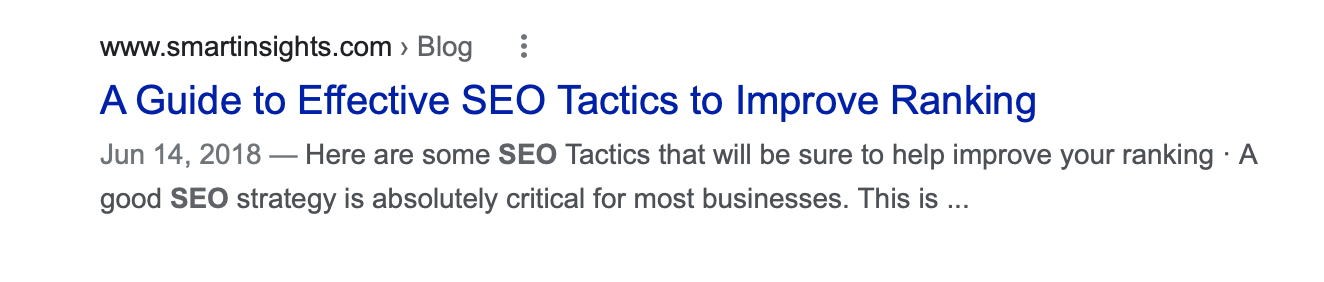
An example of a snippet, which includes the title tag and description tag
Easy Navigation and Organization
This may seem like a given, but this can massively effect the traffic on your page. All navigation tabs should have their own unique URL to increase the chances of having your webpages indexed. Navigation should also use words, not images, to ensure the keywords are being found by crawlers.
Simple URLs
URLs for each webpage should be short and accurate to the content on the page. If not, this can confuse users and make it more difficult to find. It can also make it confusing if the title tag is different from the actual URL
Webpage Content
Content is just as important as the snippet, itself. The snippet helps users find your webpage, while the content is what will keep the user on the page.
Text
The text should be easy to read and understand. There should be no misspellings or other grammatical mistakes, as this can come off unprofessional. Keywords can help users find your webpage, but using confusing or irrelevant words can make your page look unprofessional.
Links
Links should not be overused, and only utilized when needed. This is important when attempting to navigate users to other locations on your website. Anchor text is important to describing what the webpage leads to, which will encourage users to press on these links and crawlers to identify the webpages.
Photos
Photos on the webpage can help describe the text and make your webpage more aesthetic. It also can help crawlers find your images and index them by using the <img> and <picture> elements in the HTML. All pictures should have file names that represent the image, to help the picture be better found. Always use a standard image format.
Bonus tip: mobile-friendly version
By making your website mobile-friendly, it increases the accessibility and encourages more users to utilized your webpage. This is pertinent in our current technological climate, as our mobile-devices are able to accomplish the same things as our computers.